Can foreigners use WeChat Pay in China?
Yes. You can link a supported foreign card in WeChat, use Tencent's TenPayGo app, or, with a US PayPal account, pay in the PayPal app. All three pay at shops that take WeChat Pay.
ChinaEase Buddy
Maintained by Lin · Checked against official sources, October 31, 2026. TenPayGo payment tested in Dongguan, October 25, 2026
Yes. As a visitor you can pay at shops that take WeChat Pay in three ways:
WeChat with a foreign card. Sign up for WeChat with your own non-Chinese phone number and link a Visa, Mastercard, American Express, Discover, JCB, Diners Club or UnionPay card. Verify your passport to raise your limit to up to US$5,000 a payment.
TenPayGo. Tencent's payment app for visitors pays at the same shops without a WeChat account. I signed up with just an email, linked a UK Mastercard and paid at a shop in Dongguan.
PayPal, for US accounts. Since August 11, 2026, US PayPal users can scan a shop's WeChat Pay code in the PayPal app.
Fees with a foreign card: no fee on payments of ¥200 or less throughout 2026. The first time you link a card, you also pay no fee on up to ¥1,000 a day for 90 days (offer until December 31, 2026). Otherwise, a 3% fee may apply to the whole amount over ¥200.
Jump to: Which to choose · Set up · Fees and limits · TenPayGo · PayPal · How to pay · If it fails
Last reviewed: October 31, 2026
All three pay the same WeChat Pay QR codes. They differ in what you need to set up.
| WeChat + foreign card | TenPayGo | PayPal app | |
|---|---|---|---|
| Who can use it | Anyone with a supported foreign card | Anyone with a supported foreign card, Apple Pay or a supported overseas e-wallet | US PayPal accounts, since August 11, 2026 |
| What you need | WeChat signed up with a non-Chinese phone number; new accounts may need an existing user to verify you | An email address and the code it sends you | The latest PayPal app; PayPal suggests keeping money in your PayPal balance |
| Fees | None on ¥200 or less; first card you link: none on up to ¥1,000 a day for 90 days; otherwise 3% may apply | Shown before you pay; none on my ¥4.90 payment | Not stated in PayPal's announcement |
| Also covers | Mini programs such as DiDi, and metro ride codes in many cities | Shenzhen metro and buses | Paying at shops |
| How I checked | Official sources | Tested in Dongguan, October 2026 | PayPal's announcement (not tested) |
My advice: if WeChat lets you sign up, link your card there, because you can then also order and pay in mini programs. If it won't verify you, TenPayGo pays at the same shops with just an email. Either way, set up Alipay as well: Alipay for foreigners.
Install or update WeChat and sign up with your own phone number. Tencent's guide says any country code other than +86 works for linking a foreign card.
If WeChat asks an existing user to verify your new account and you don't know anyone, see WeChat verification without a friend's QR code.
Open Me, then Services and Wallet, and add your card with its basic details. Menu names can differ slightly between versions.
Approve any check your bank sends to its app, and set the 6-digit payment PIN when WeChat asks.
To raise your limit, verify your identity with your passport. Tencent says this can take seconds.
Do it at home before you fly, so any checks from your bank are sorted out before you need to pay. Turn on overseas and online payments in your banking app so your first payment in China isn't blocked.
¥200 or less: no 3% fee, for all foreign cards, throughout 2026 (WeChat Pay, May 2026).
The first card you link: no 3% fee on up to ¥1,000 a day for 90 days after your first payment. The offer runs until December 31, 2026.
Otherwise, over ¥200: a 3% fee may apply to the whole amount (Shanghai government, September 2026). On a ¥300 dinner, that's ¥9.
Your bank may add its own foreign transaction or currency conversion fee.
The fee line shows on the confirmation screen before you tap Pay, so check it on bigger payments.
| Per payment | Per year | |
|---|---|---|
| Passport verified | Up to US$5,000 | Up to US$50,000 |
| Not verified | Lower (Tencent doesn't give a figure) | Lower |
China raised these limits in March 2024, from US$1,000 a payment and US$10,000 a year.
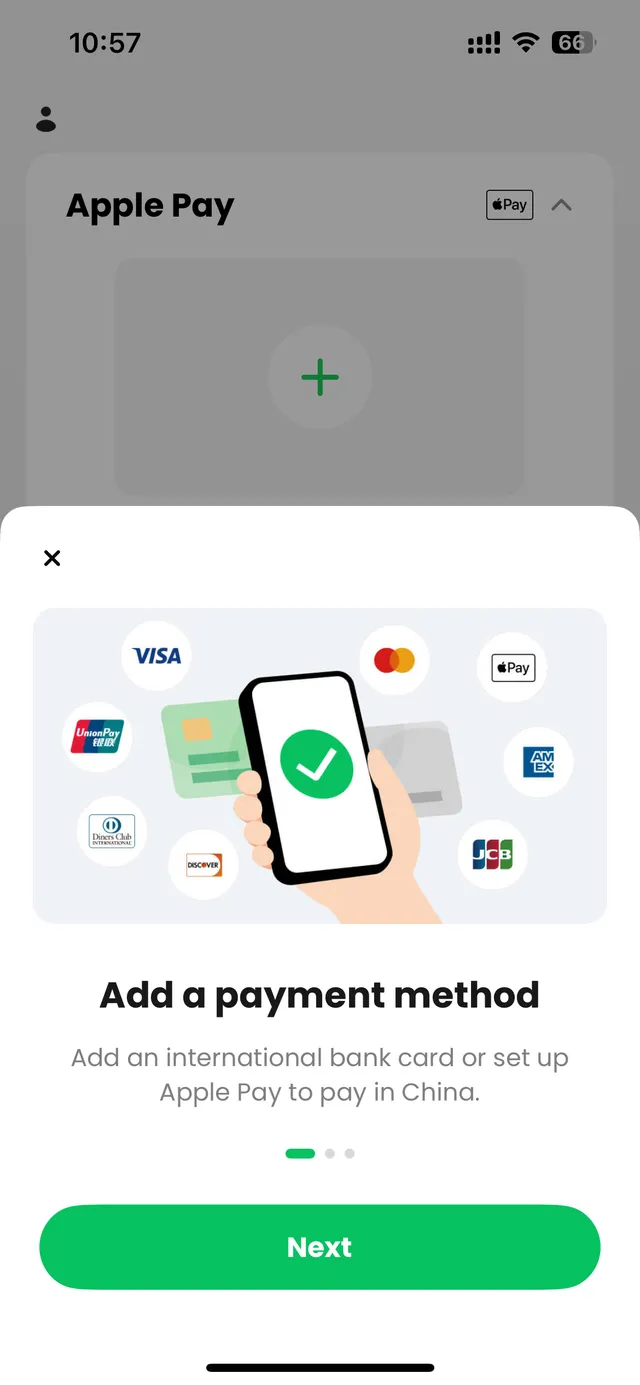
TenPayGo is Tencent's own payment app for visitors, launched on September 24, 2026. It isn't WeChat: it's a separate app that pays at shops that take WeChat Pay. You don't need a WeChat account or a Chinese phone number.
Sign-up: an email address and the code it sends. It didn't ask for a phone number, passport or face scan.
Card: I linked a UK Mastercard. My bank asked me to approve a ¥0.00 check.
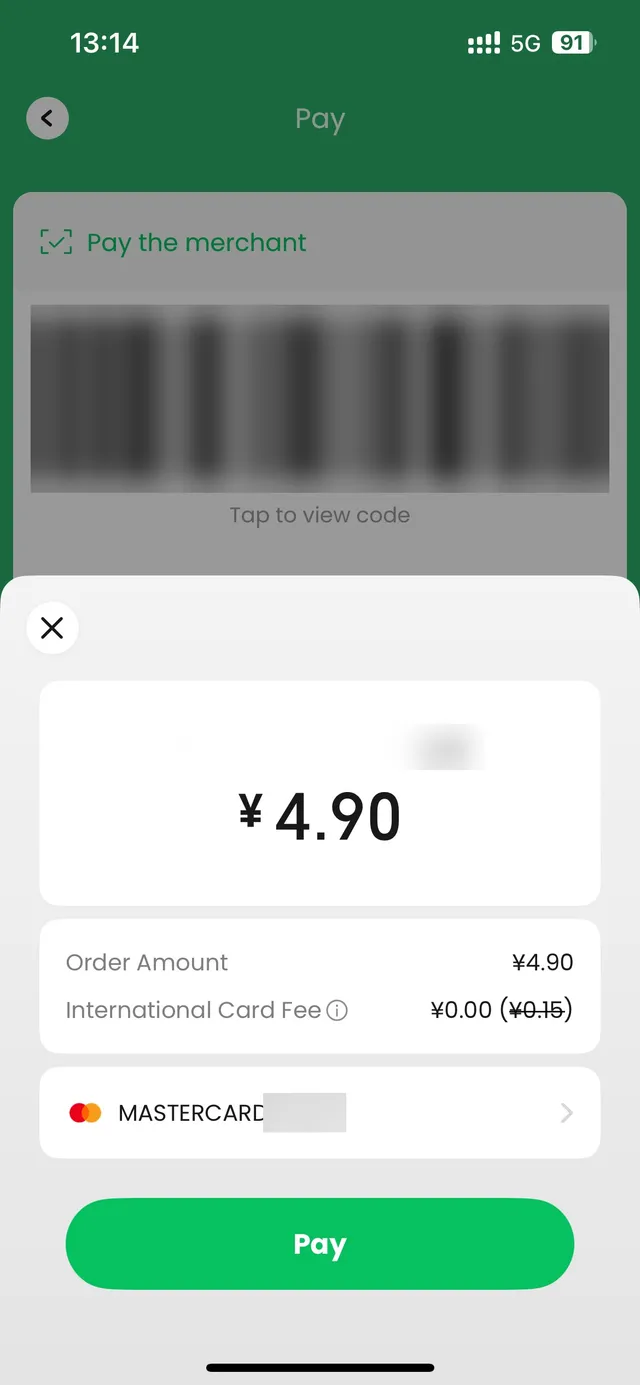
Paying: I paid ¥4.90 at a shop in Dongguan by showing my payment code. The ¥0.15 card fee (3%) was crossed out.
The full test, including the Shenzhen metro: TenPayGo review.
Since August 11, 2026, PayPal says US PayPal users can pay at Weixin Pay merchants across China:
Open the PayPal app and scan the shop's WeChat Pay QR code, or show the QR code in the PayPal app for the cashier to scan.
You don't need another app, a local wallet or a Chinese bank account.
PayPal suggests updating the app first, keeping money in your PayPal balance (Auto Reload is optional) and turning on location services.
So far it's for US accounts only. PayPal's announcement doesn't mention fees or the exchange rate, so check the amount before you confirm. I don't have a US PayPal account, so I haven't tested it.
Whichever app you use, there are two ways to pay:
The shop scans your code: open your payment code and hold it up to the scanner.
You scan the shop's code: scan the QR code on the counter, type the amount, check the shop name and pay.
In restaurants, the QR code on the table usually opens a mini program, an ordering page inside WeChat or Alipay, where you order and pay. TenPayGo and PayPal are for paying, and I haven't tried ordering with them. If the code won't open, ask staff to take your order. More: how to order food in China.
Never send a photo of your payment code to anyone: whoever scans it can take a payment.
| What happened | What to do |
|---|---|
| WeChat wants an existing user to verify you | Try the steps in WeChat verification without a friend's QR code, or use TenPayGo, which only needs an email. |
| Your card won't add | Look for a blocked attempt in your banking app and approve it, or call your bank. Or try another card. |
| A bigger payment is declined | You may have reached the limit for unverified accounts. Verify your passport, or pay with Alipay or a physical card. |
| You're not sure a payment went through | Check the payment record in the app before you pay again. |
Keep backups: Alipay with a card linked, a physical card and some cash.
可以用微信支付吗? — Can I pay with WeChat Pay?
请扫我的付款码。 — Please scan my payment code.
这个是商家收款码吗? — Is this a merchant payment code?
支付失败了,可以换一种方式吗? — My payment failed. Can I pay another way?
Yes. You can link a supported foreign card in WeChat, use Tencent's TenPayGo app, or, with a US PayPal account, pay in the PayPal app. All three pay at shops that take WeChat Pay.
Yes. Visa, Mastercard, American Express and Discover are among the supported networks, in WeChat or TenPayGo. Since August 2026, US PayPal users can also pay WeChat Pay codes in the PayPal app. Your bank can still decline a payment.
Payments of ¥200 or less have no fee throughout 2026. The first time you link a card, you pay no fee on up to ¥1,000 a day for 90 days (offer until December 31, 2026). Otherwise a 3% fee may apply to the whole amount over ¥200, and your bank may add its own fee.
With passport verification, up to US$5,000 a payment and US$50,000 a year. Unverified accounts have a lower limit, which Tencent doesn't publish.
No. You pay with a foreign card. Tencent's guide says to sign up with a non-Chinese phone number, and TenPayGo only needs an email.
Yes. TenPayGo, Tencent's app for visitors, pays at the same shops and signs you up with an email. US PayPal users can pay in the PayPal app.
Yes. Weixin Pay is the official name of the payment service in mainland China; Tencent and the TenPayGo app use it. WeChat Pay HK is a separate Hong Kong wallet with its own rules.
Yes, and it's easier at home: sign up, link your card and verify your passport while you can still approve your bank's checks.
Approve any blocked attempt in your banking app and check whether you've reached the limit for unverified accounts. Then pay with Alipay, another card or cash, and check the payment record before trying again.
Set up both if you can. In my experience most shops take both, so one is your backup. Restaurant table ordering usually opens a mini program inside WeChat or Alipay.
I'm Lin — Chinese, lived abroad for years, and in China right now. Send me your dates or draft route and I'll reply within 48 hours with the 3 biggest route, timing or booking risks. Free. Human customized itinerary planning is a separate paid service.
I only recommend guides; I don't take payment for guide or driver services.
lin@chinaeasebuddy.com
Include your travel dates, cities and main questions. Please leave out passport numbers, payment details and other sensitive information.
ChinaEase Buddy is a digital travel toolkit. It is not an official travel authority, visa service, immigration service, medical service, legal service, financial service, hotel booking service, or flight booking service. Always confirm important travel, payment, health, and entry information with official sources or service providers.