Does Amap have an English version?
Yes. Switch it in My → Settings → Language, then restart Amap. Since July 2025 Amap also supports 14 more languages, including Spanish, French, German, Japanese, Korean, Russian and Arabic.
ChinaEase Buddy
Maintained by Lin · Tested on iPhone 14 (iOS 18.5), AMap Global 17.2, Dongguan, October 23, 2026
Download AMap Global (publisher: AutoNavi). In Amap, tap My → ⚙️ Settings → Language → English, then close Amap completely and reopen it. Amap itself reminds you to restart after changing the language.
This works when your phone is set to a non-Chinese language and region, as most visitors' phones already are. (English grayed out? Here's the fix.)
The app's buttons and route directions switch fully, but many shop and street names stay in Chinese, so keep your hotel's Chinese address handy.
Tested on iPhone 14, Dongguan, October 23, 2026.
Jump to: English grayed out? · Book a taxi · Metro exits · Menu translation · Offline
Last reviewed: October 23, 2026
In the App Store and Google Play the app is called AMap Global, published by AutoNavi Information Technology. It's the same app Chinese drivers and locals use: in China's App Store it's listed as 高德地图 (Gaode), with the same publisher. Ignore look-alike apps with "English map" in their name.
Update before you fly: newer features such as English taxi booking only appear in recent versions.
Tap My (我的), bottom right.
Tap the gear icon (设置 Settings), top right.
Tap Language (语言设置) and choose English.
Close Amap completely (swipe it away) and reopen it.
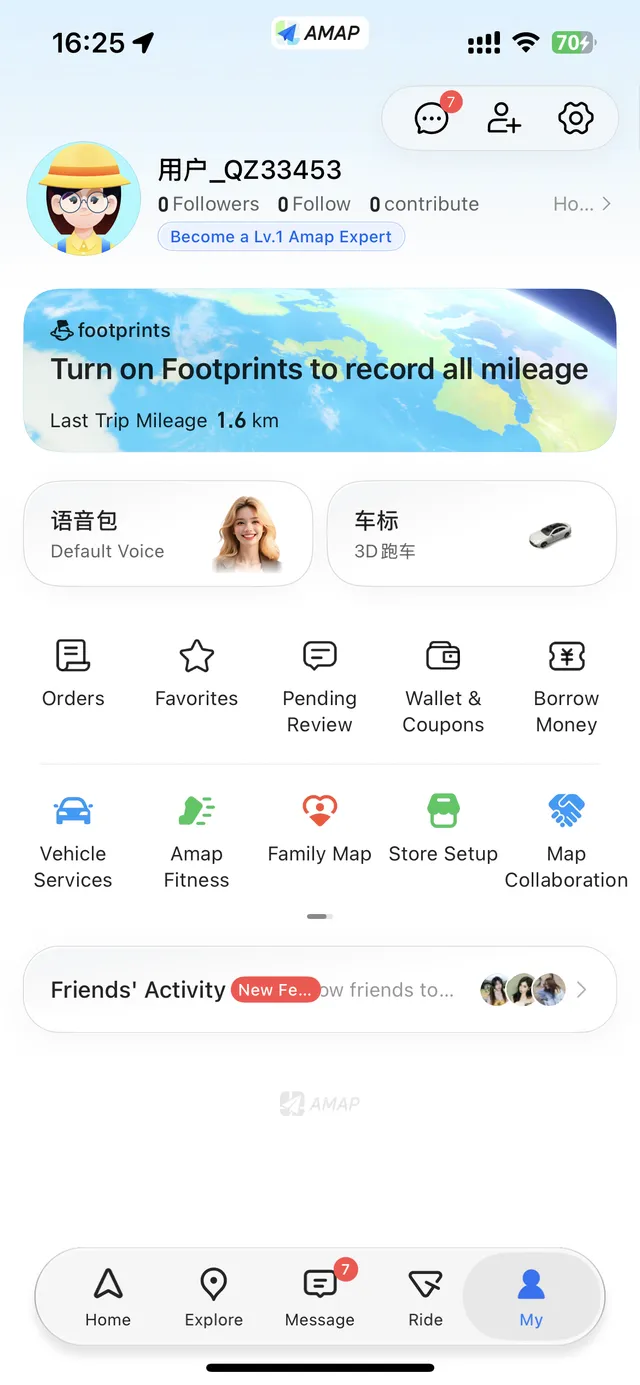
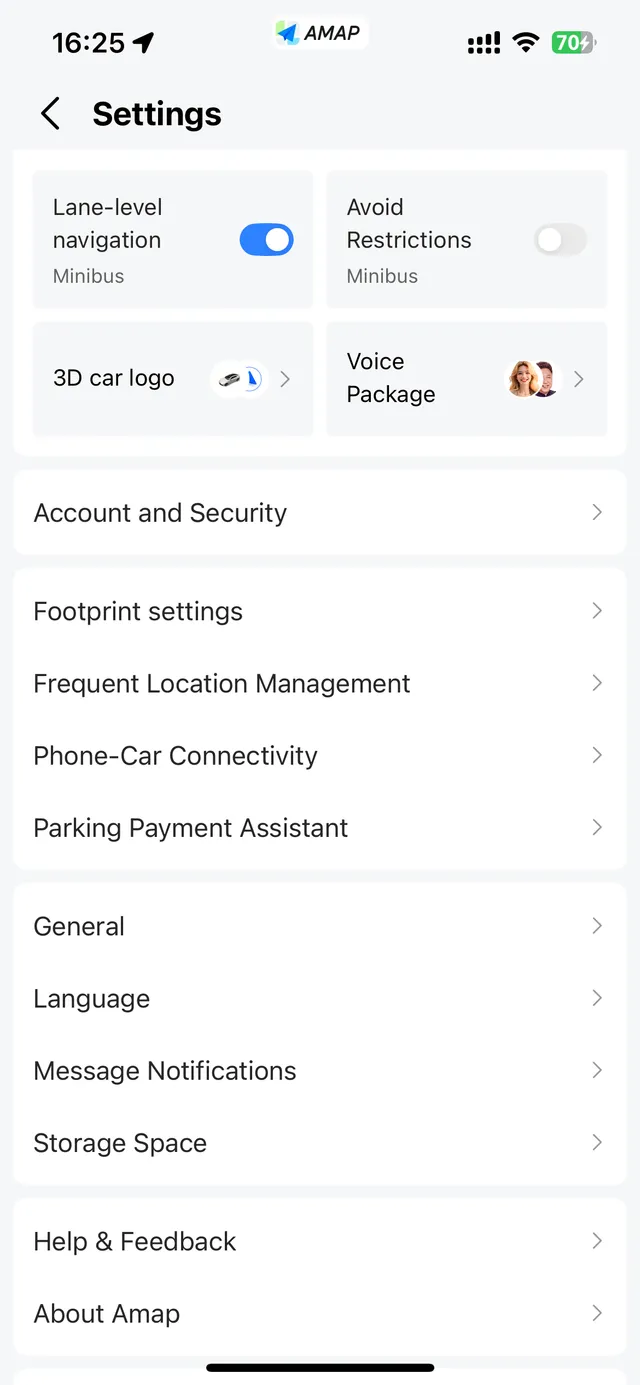
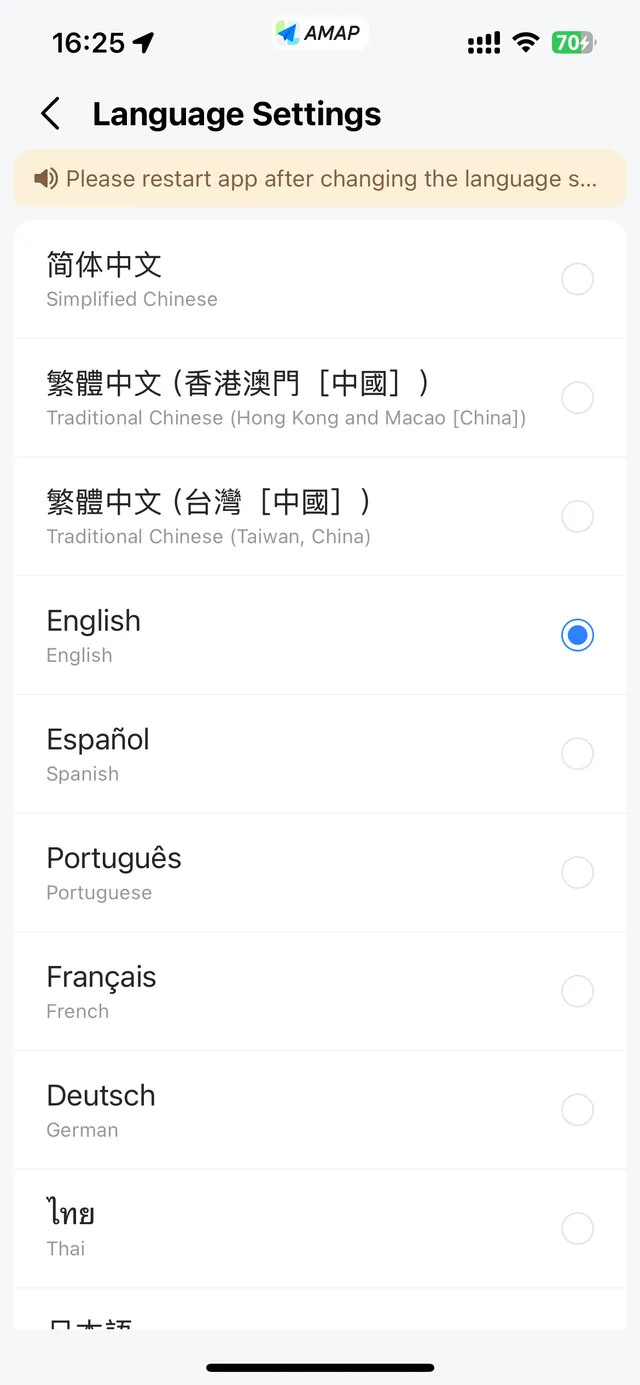
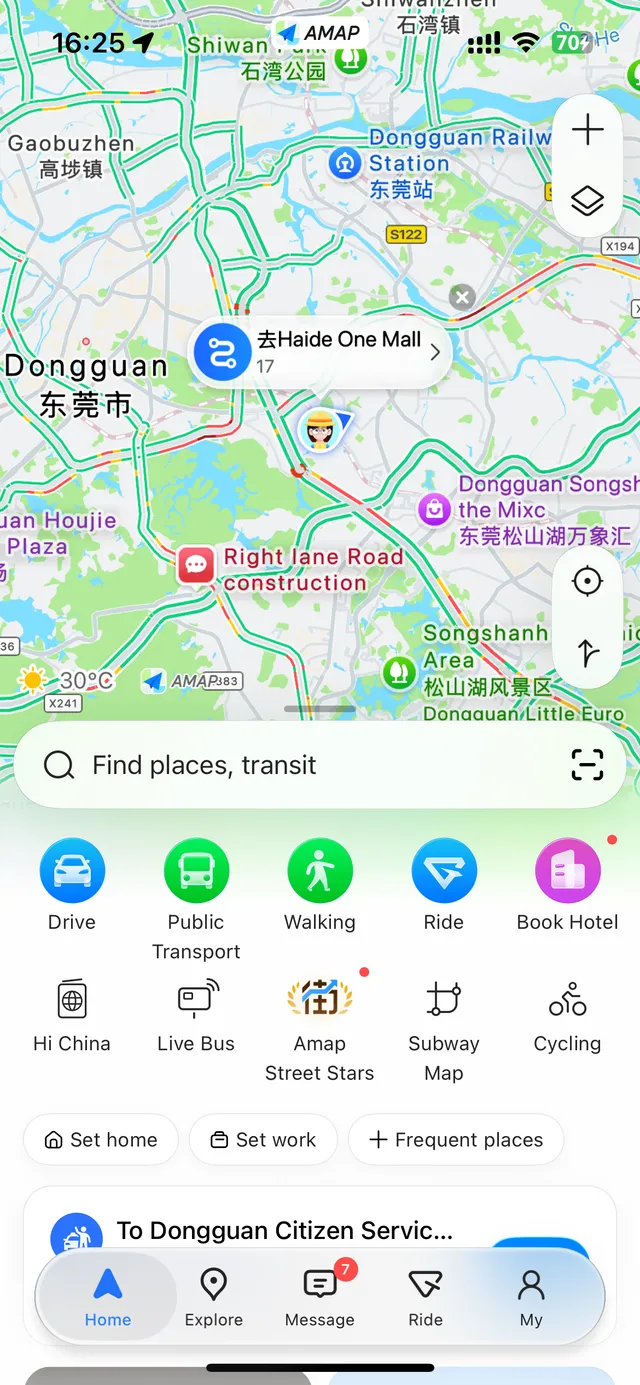
That's three taps to the language list. The same list also has Spanish, Portuguese, French, German, Thai, Japanese and more.
Android: you can also try Settings → System → Languages → App languages → AMap → English. This works on supported phones; Google notes some steps need Android 14 or later.
If your phone is set to Chinese, Amap's language list shows English and the other foreign languages grayed out (greyed out).
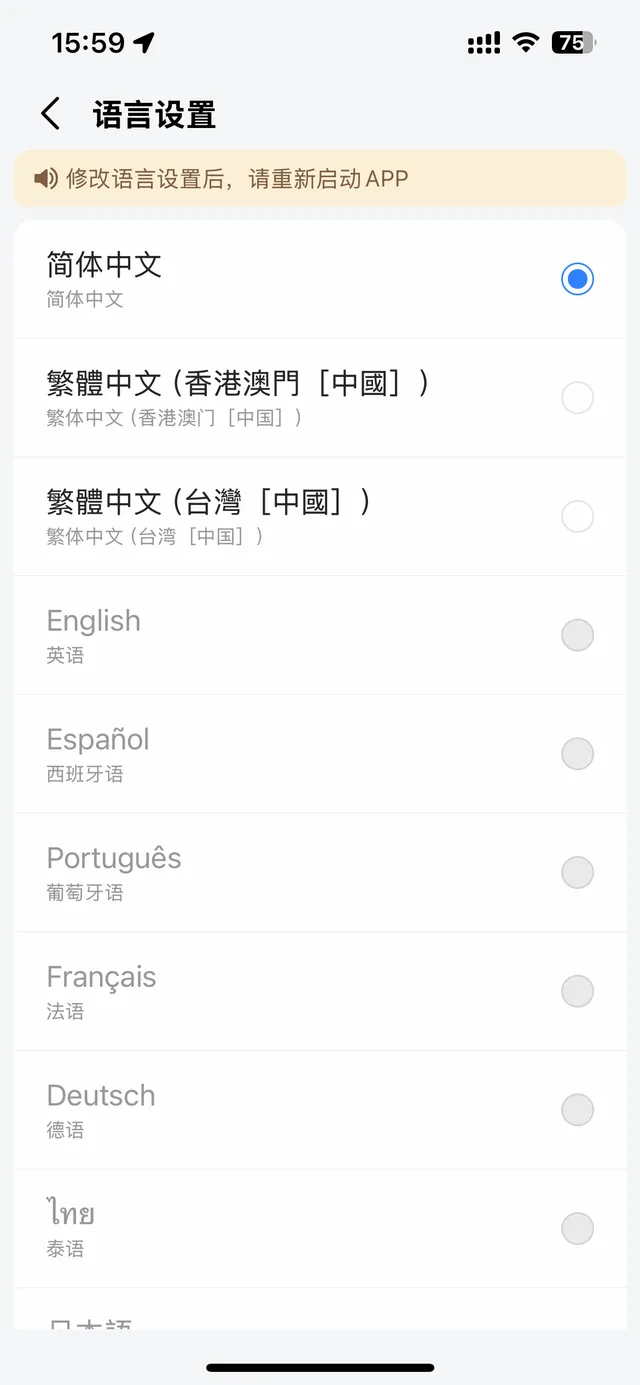
This mostly catches overseas Chinese visitors or anyone who uses their phone in Chinese. The fix: go to iPhone Settings → General → Language & Region, set the iPhone language to English and the region to a country outside mainland China (I used United Kingdom), then choose English in Amap and restart it.
The app's buttons and turn-by-turn directions switch to English. Since July 2025, Amap also shows English names and descriptions for key places such as major attractions, hotels and restaurants. Smaller shops, bus stops and many residential compounds still appear in Chinese, and so do some details: on station pages, for example, the facilities list (toilets, baby rooms) is in Chinese. Tap View Translation to translate it.
English search works, but watch the branch
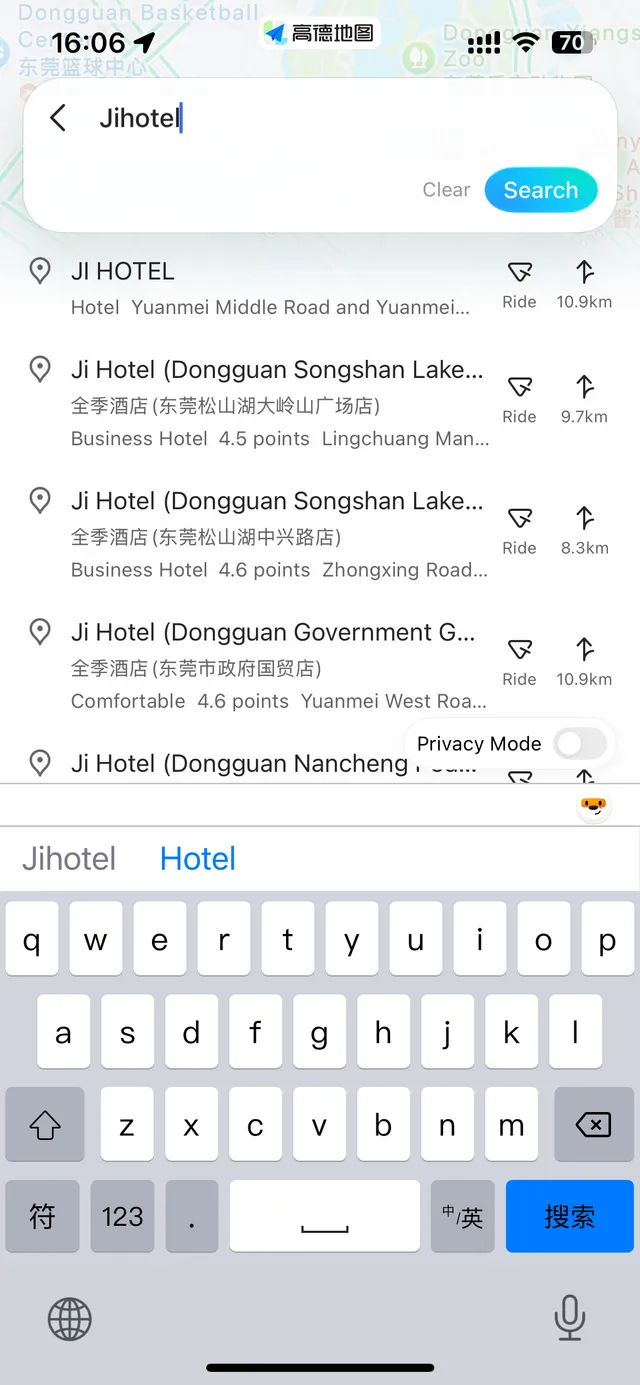
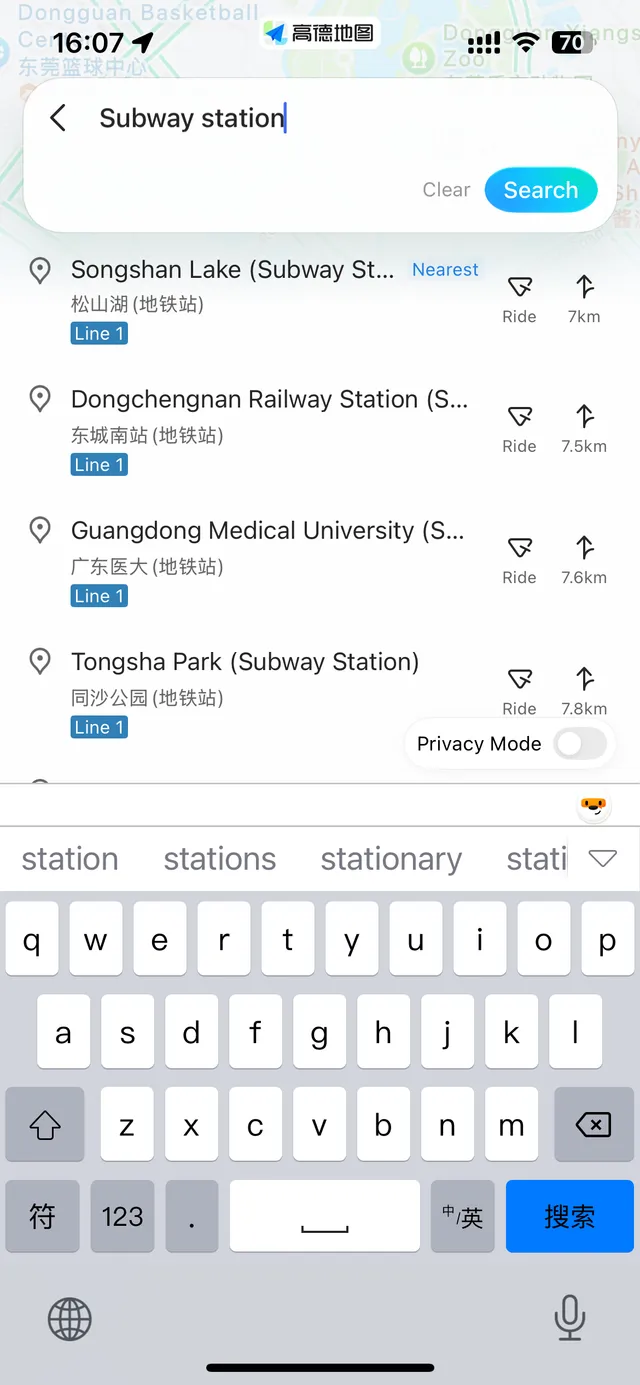
I searched for Ji Hotel in English and got five branches of the same chain in one city, each with its Chinese name underneath. Pick the branch whose Chinese name matches your booking confirmation.
Searching "subway station" listed the nearby stations with English and Chinese names, the line number, and a Nearest tag.
Your own hotel by its Chinese name always works best. Copy the name from your booking confirmation.
Watch out for twins: Shanghai Hongqiao Railway Station (上海虹桥站) and Shanghai Hongqiao International Airport (上海虹桥国际机场) are different places, and Pudong Airport (上海浦东国际机场) is another airport again. Match the name on your ticket.
No. According to Amap, its main features work without logging in. To book a taxi you do sign in, and you don't need a Chinese SIM for that either: the sign-in screen offers country codes beyond mainland China, Amap's August 2026 update says numbers from 65 countries and regions work, and you can skip the phone number entirely by signing in with email, Apple or Google (or WeChat, Alipay or Taobao).
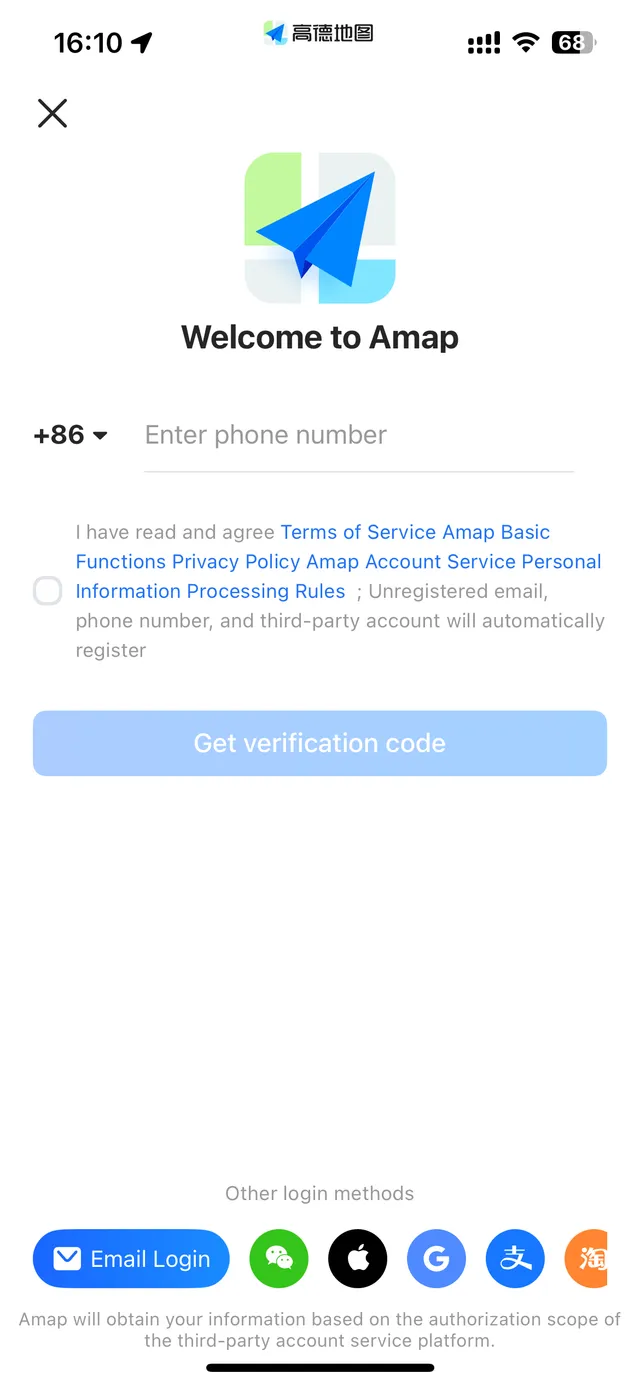
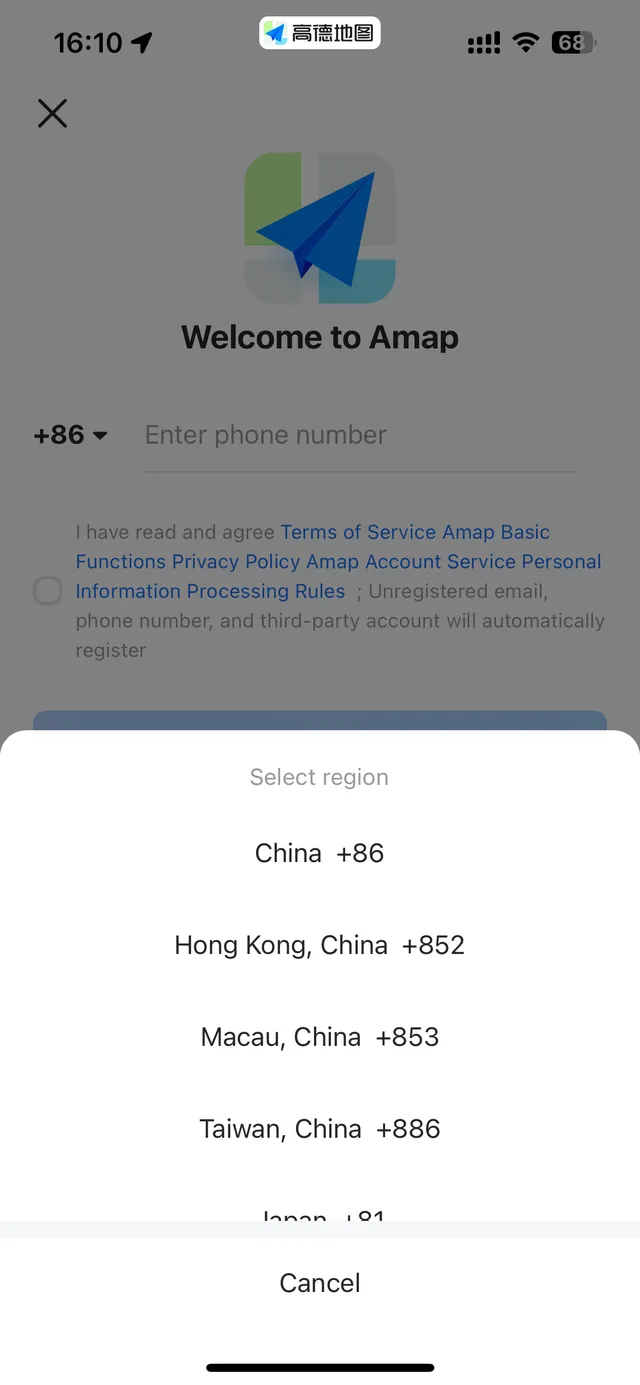
To pay for rides, link a card to Alipay or WeChat Pay first: Alipay for foreigners · WeChat Pay for foreigners.
Since August 2026, AMap Global lets international visitors book rides in English. Tap Ride on the Home screen (or the ride icon on any route screen), set your destination, choose a car type, check the fare estimate and pickup point, then confirm. Amap sends your request to a network of ride-hailing and taxi operators in one tap.
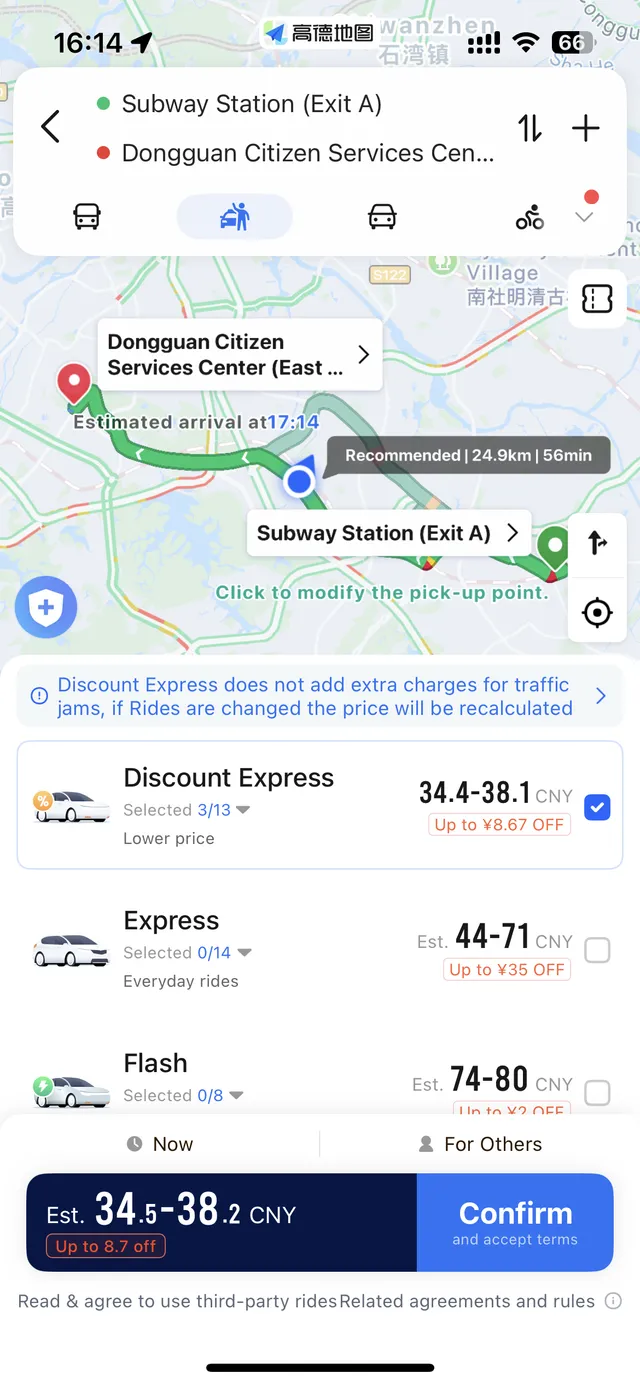
What I saw on two trips in Dongguan on October 23, 2026 (fares change with time and traffic):
| Ride type | What it's for | 14 km, 32 min | 25 km, 56 min |
|---|---|---|---|
| Discount Express | Cheapest; no extra charge for traffic jams (the price is recalculated if you change the trip) | 19–23 CNY | 34–38 CNY |
| Express | Everyday rides | about 24 CNY | 44–71 CNY |
| Flash | Faster pickup | 36–39 CNY | 74–80 CNY |
| Taxi | Regular taxi | about 49 CNY | about 96 CNY |
On the longer trip, Discount Express cost less than half the taxi fare.
You can tick several ride types at once, and each one goes out to several ride platforms (mine showed "Selected 3/13"), so more drivers can pick up your request. If the pickup pin is in the wrong spot, tap the pickup label on the map to move it. Before you confirm, Amap asks you to accept the third-party ride terms. You can also book For Others. I stopped before booking, so I haven't tested the payment step.
Amap or DiDi? Amap books across several operators from the map you're already using. DiDi is a single platform with its own English app. Step-by-step DiDi setup: DiDi in China for foreigners.
Before your first ride, read about paying for DiDi with a foreign card.
Search your destination, then tap the bus icon (Public Transport) on the route screen. Amap lists several options with total journey times. Each leg shows the line (intercity trains as well as metro), how many stops, where to get off, when the next train leaves, and which station entrance to use plus how far you'll walk to it.
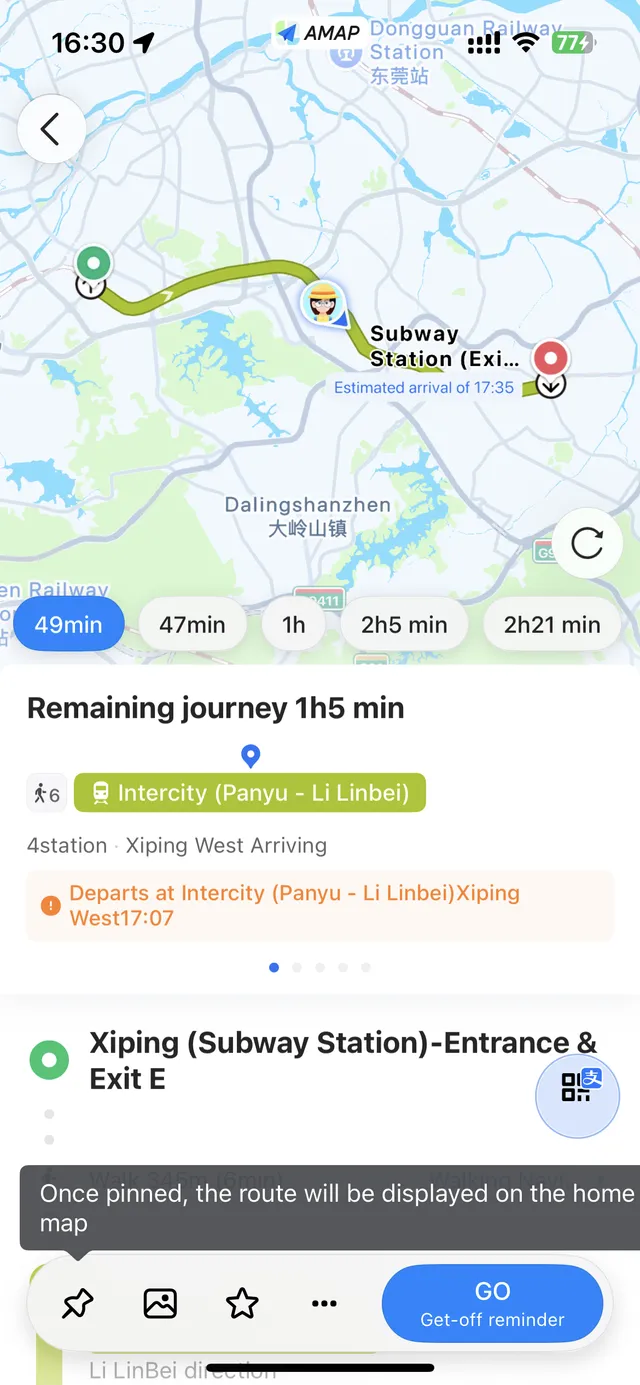
Tap GO to start the route with a get-off reminder, so you don't miss your stop.
Tap any station to see its entrances and exits, the fare range, first and last train times in each direction, and a live countdown to the next train with how crowded it is.
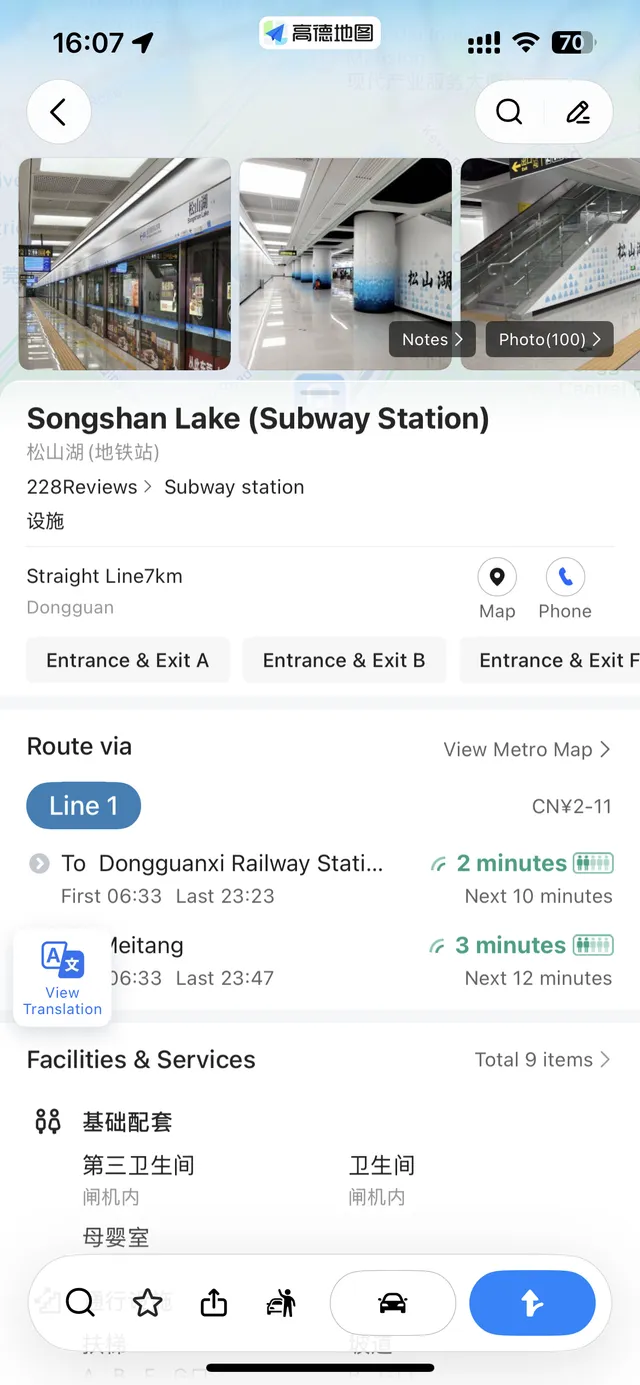
For the whole network, use the Subway Map shortcut on the Home screen.
For walking routes, zoom in near big roads, footbridges and malls to check where the entrance actually is. More on metro tickets and gates: China metro guide.
Before your first ride, check how to pay for the metro with Alipay or your card.
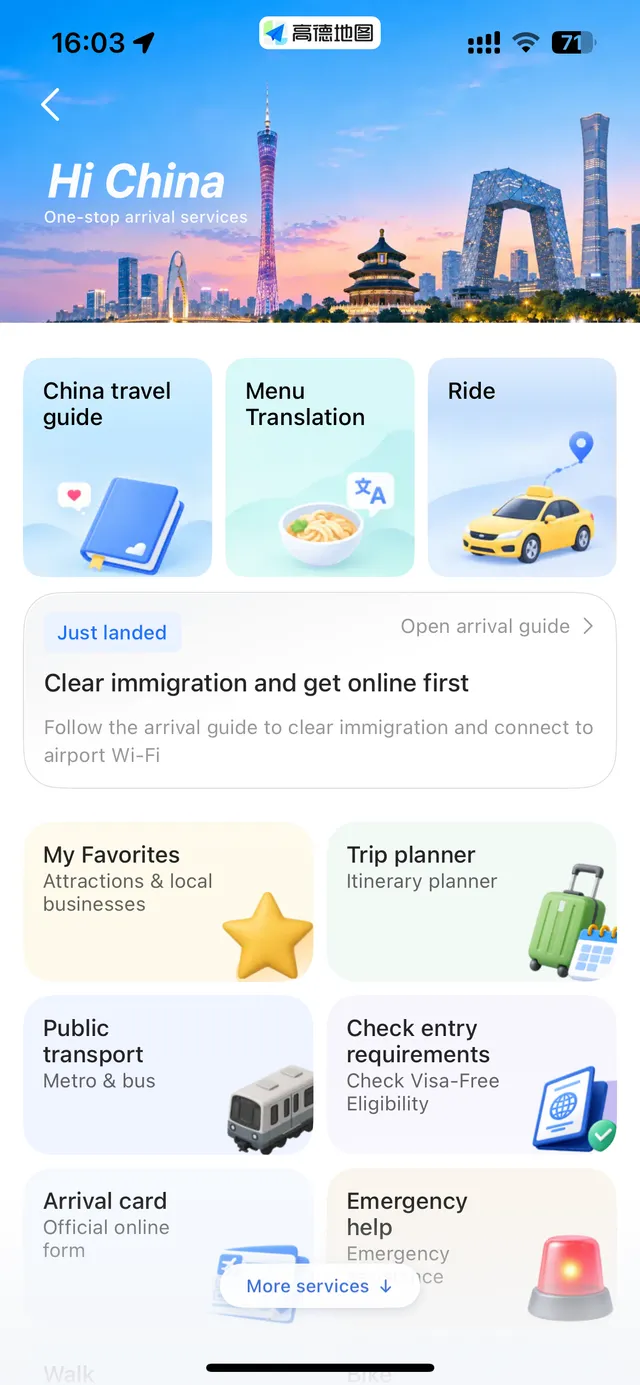
On the Home screen, tap Hi China: it's in the shortcut icons below the search bar, right under Drive. It's Amap's one-stop page for international visitors.
Take a photo of a Chinese menu and Amap turns it into an English one: each dish gets an English name above the Chinese, tags such as spicy, pork or seafood, a short description, and the price in yuan with an approximate dollar amount.
Tap + to add dishes and set your Dietary Preferences: severe allergies (peanut, tree nuts, crustaceans, milk, egg and more), restrictions such as no pork or gluten-free, and how spicy you want it. Amap then builds a card to show the staff: a polite request in Chinese, your dishes, your dietary preferences and the estimated total, with a bill splitter underneath.
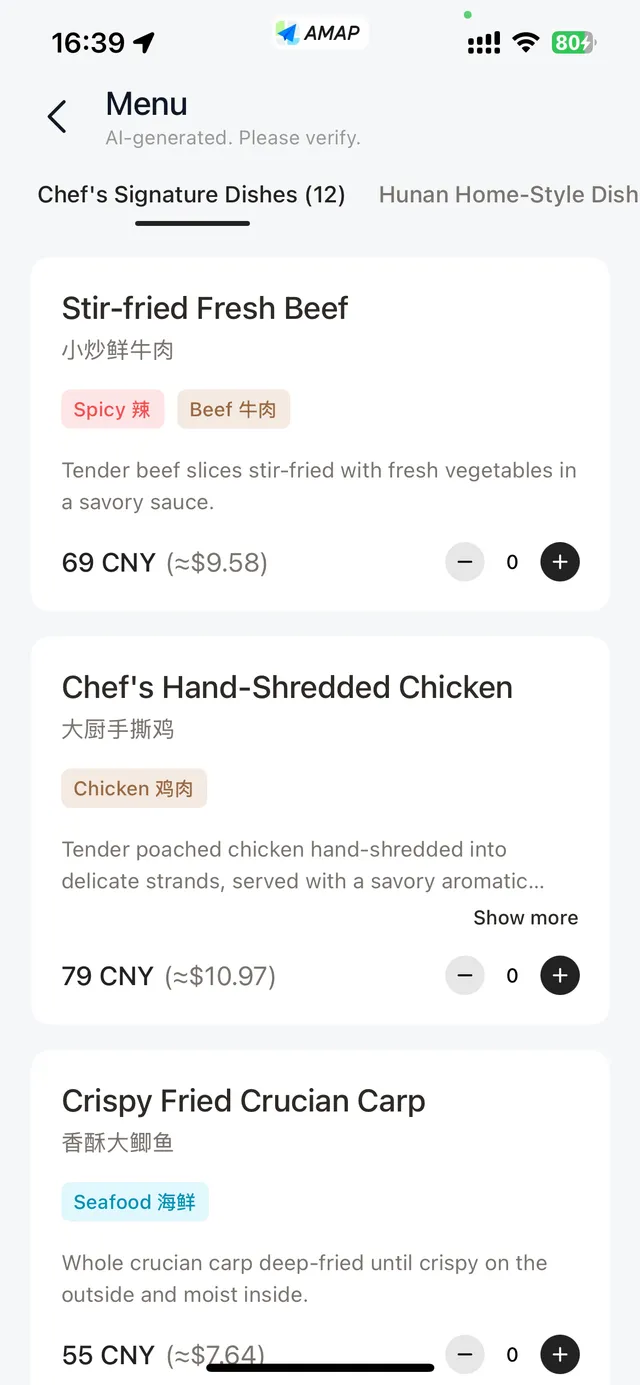
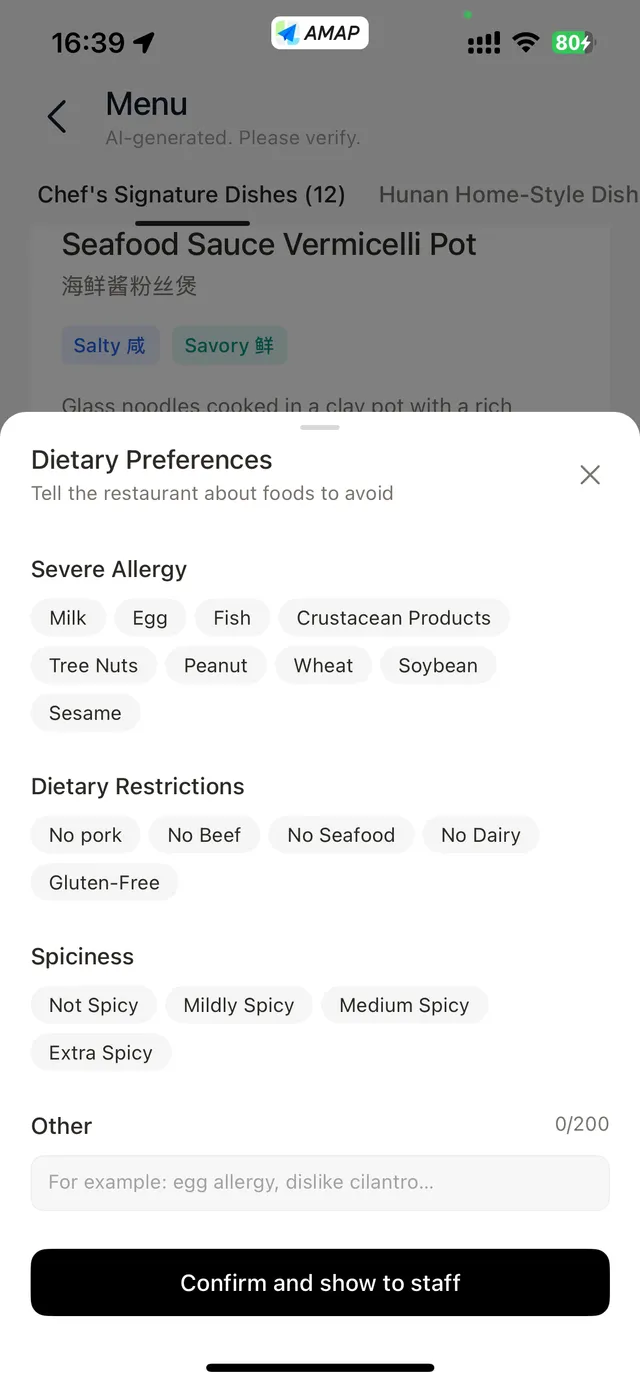
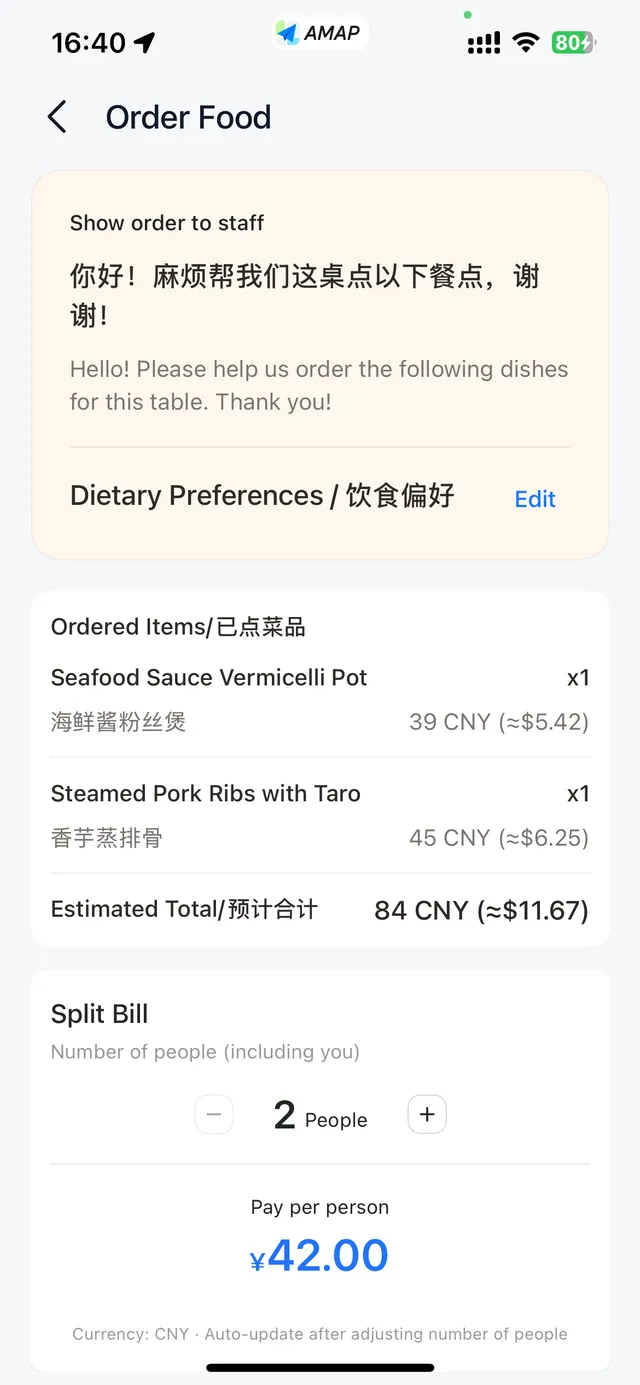
Amap marks these translations as machine-generated and asks you to check them. If you have a severe allergy, add it in Dietary Preferences so it shows on the card, and confirm with the staff before you eat.
More on ordering: How to order food in China.
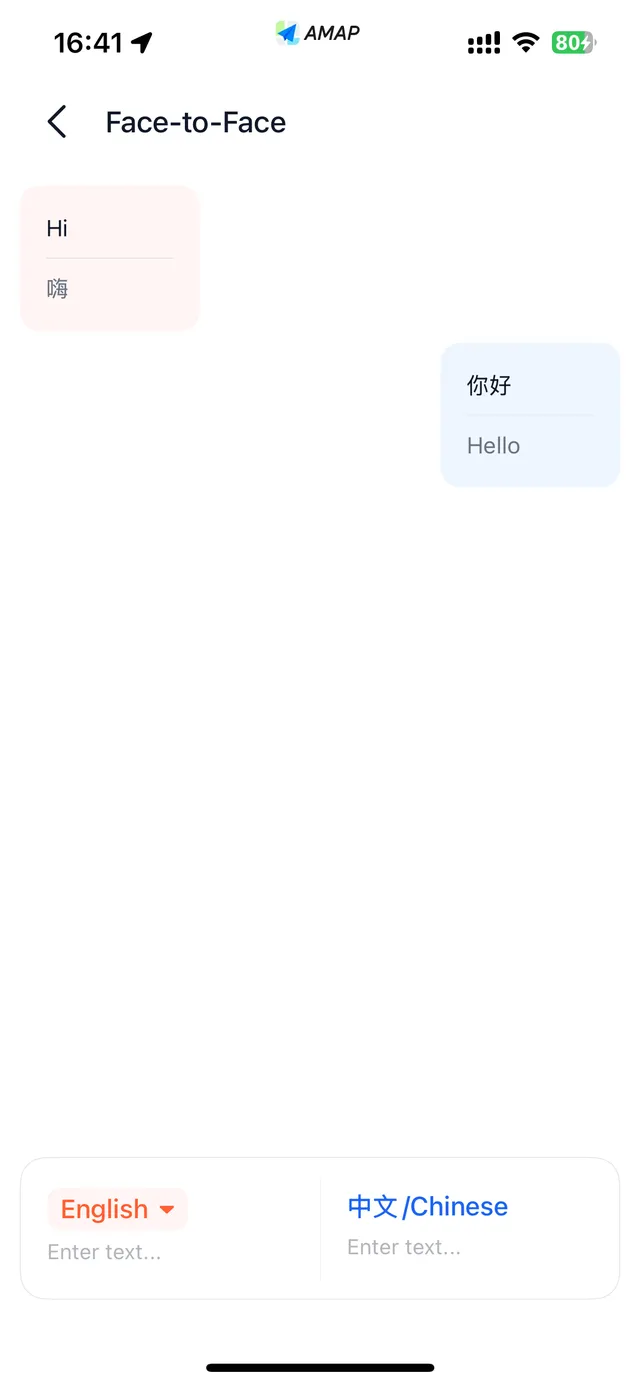
Face-to-Face Translation: type in English or Chinese and both appear on screen, for quick back-and-forth with staff or drivers.
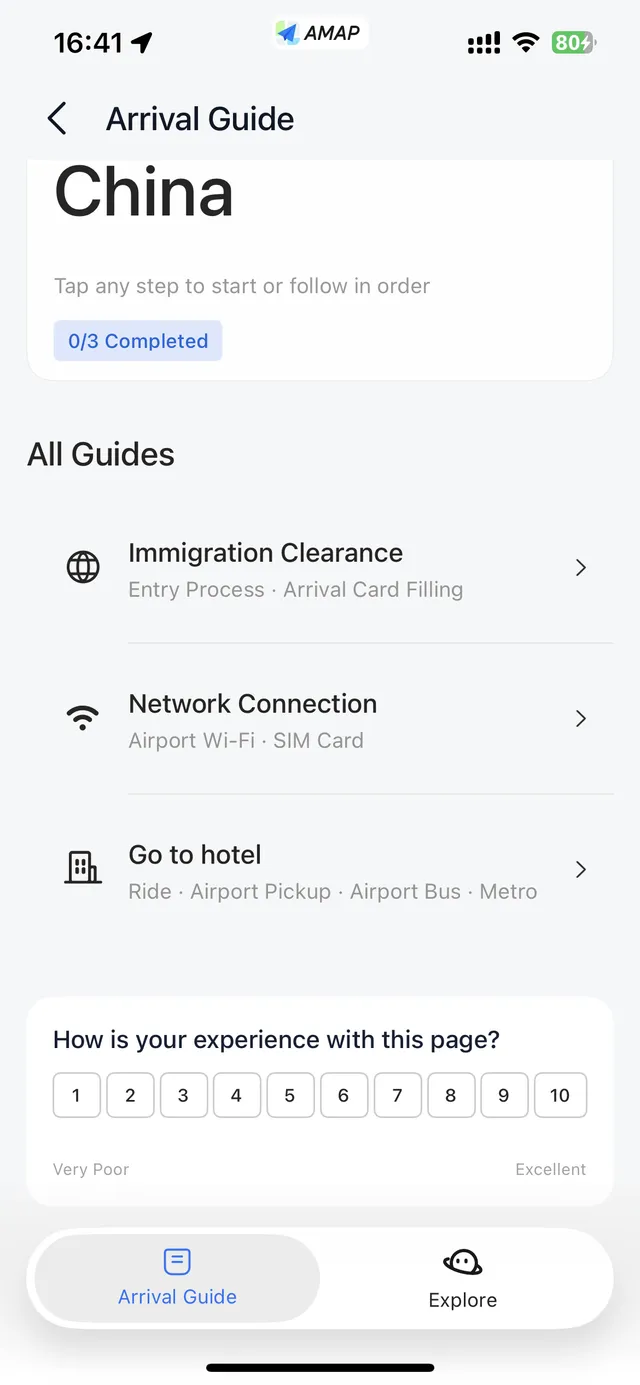
Arrival Guide: three checklists for landing: immigration and the arrival card; getting online (airport free Wi-Fi in three steps, and buying a SIM card at the airport from China's three main carriers: physical SIMs only, passport required); and getting to your hotel by ride, airport pickup, airport bus or metro. The Wi-Fi and SIM checklist includes phrases in Chinese with pinyin.
See also: China airport arrival guide.
Ride, Public transport, Walk and Bike: shortcuts to Amap's navigation features.
Trip planner, Check entry requirements (visa-free eligibility), Arrival card (official online form), Hotels, Cultural Notes and Emergency help.
Many guides tell you to download offline maps from Me → Offline Maps. In the October 2026 English version (17.2), I couldn't find that entry anywhere. Amap's update notes mention offline navigation, but I couldn't confirm how to use it from the English interface. So don't count on offline maps: screenshot your hotel's Chinese address and key routes, and get a working data plan before you land: China eSIM & internet guide.
| Problem | Fix |
|---|---|
| English is grayed out in Amap's language list | Set your iPhone language to English and region outside mainland China, then choose English in Amap and restart it (details) |
| Chose English but the app is still in Chinese, or a mix of both | Close Amap fully and reopen it; the change only applies after a restart |
| Can't find the Language option | It's in My → ⚙️ Settings → Language. If it isn't there, update AMap Global to the latest version |
| App in English, hotel name in Chinese | That's normal. Search by the Chinese name or paste the Chinese address from your booking |
| Wrong branch, airport or station | Compare the district, street and distance. Use the full Chinese name and match the terminal or station on your ticket |
| Can't book a taxi | Sign in (email, Apple or Google work), link Alipay or WeChat Pay, and update the app |
这个地址在哪里? — Where is this address?
请问最近的地铁站入口在哪里? — Where is the nearest metro entrance?
我应该从哪个出口出去? — Which exit should I use?
这是正确的火车站吗? — Is this the correct railway station?
请带我到这个地址。 — Please take me to this address.
Yes. Switch it in My → Settings → Language, then restart Amap. Since July 2025 Amap also supports 14 more languages, including Spanish, French, German, Japanese, Korean, Russian and Arabic.
In my test, English and the other foreign languages were grayed out while my iPhone was set to Chinese. Setting the iPhone to English with a region outside mainland China unlocked them.
Yes. Downloading and using the map is free; you only pay for rides you book.
No. Amap is a Chinese app and works on Chinese mobile networks without a VPN.
No. The main features work without an account. To book taxis you sign in, and you can use email, Apple or Google instead of a phone number; Amap says numbers from 65 countries and regions also work.
Yes. In Hi China, Menu Translation turns a photo of a Chinese menu into English dish names with tags and prices, then shows your order to the staff in Chinese. Confirm allergies with the staff.
Don't count on it. Amap's update notes mention offline navigation, but in the October 2026 English version I couldn't find an Offline Maps entry. Save screenshots of key addresses and routes, and get a data plan.
For mainland China, yes. See Amap vs Google Maps in China.
I'm Lin — Chinese, lived abroad for years, and in China right now. Send me your dates or draft route and I'll reply within 48 hours with the 3 biggest route, timing or booking risks. Free. Human customized itinerary planning is a separate paid service.
I only recommend guides; I don't take payment for guide or driver services.
lin@chinaeasebuddy.com
Include your travel dates, cities and main questions. Please leave out passport numbers, payment details and other sensitive information.
ChinaEase Buddy is a digital travel toolkit. It is not an official travel authority, visa service, immigration service, medical service, legal service, financial service, hotel booking service, or flight booking service. Always confirm important travel, payment, health, and entry information with official sources or service providers.